ESA CCI Biomass V5.01 — Access and Visualization (Token-secured)
Authors: Rajat Shinde (UAH), Alex Mandel (Development Seed), Sheyenne Kirkland (UAH), Harshini Girish (UAH), Jamison French (Development Seed), Henry Rodman (Development Seed), Chuck Daniels (Development Seed), Zac Deziel (Development Seed), Brian Freitag (NASA), Francesco Ferrante (SERCO), Cristiano Lopes (ESA)
Date: August 29, 2025
Description: This notebook documents how to access and visualize the ESA CCI Biomass V5.01 dataset hosted on the ESA MAAP server. It is an example illustrating data access from ESA server based on ESA MAAP Token using the NASA MAAP Authorization.
What you will do
Understand the product and file organization.
Obtain an ESA data access offline token.
Convert offline token to a short-lived data access token
Access the ESA BIOMASS Level 1a raster using the data access token.
Visualize in Python.
Run This Notebook
To access and run this tutorial within MAAP’s Algorithm Development Environment (ADE), please refer to the Getting started with the MAAP section of our documentation.
Disclaimer: It is highly recommended to run this tutorial within MAAP’s ADE, which already includes packages specific to MAAP, such as maap-py. Running the tutorial outside of the MAAP ADE may lead to errors.
Prerequisites
An active ESA MAAP portal account with access initialized.
OAuth2 client credentials for your ESA realm.
Python packages:
requests,rasterio,numpy,matplotlib(optional:pystac-client,stackstac).
Importing and Installing Packages
[2]:
# Install if needed. Comment out if already available.
# !mamba install -y -c conda-forge rasterio xarray matplotlib fsspec requests
# !pip install pystac-client stackstac

import os
import stat
import getpass
import pathlib

import requests
import numpy as np
import numpy.ma as ma
import matplotlib.pyplot as plt

import rasterio as rio
from rasterio.merge import merge
from rasterio.plot import show
from affine import Affine
from pathlib import Path

from pystac_client import Client


plt.rcParams["figure.figsize"] = (6, 6)
plt.rcParams["axes.grid"] = False
Getting the ESA MAAP Long Lasting Token
This explains how to retrieve a long lasting token (hereafter, offline token) from the ESA MAAP portal using your browser and NASA EDL login. The offline token is valid for a 90-day period.
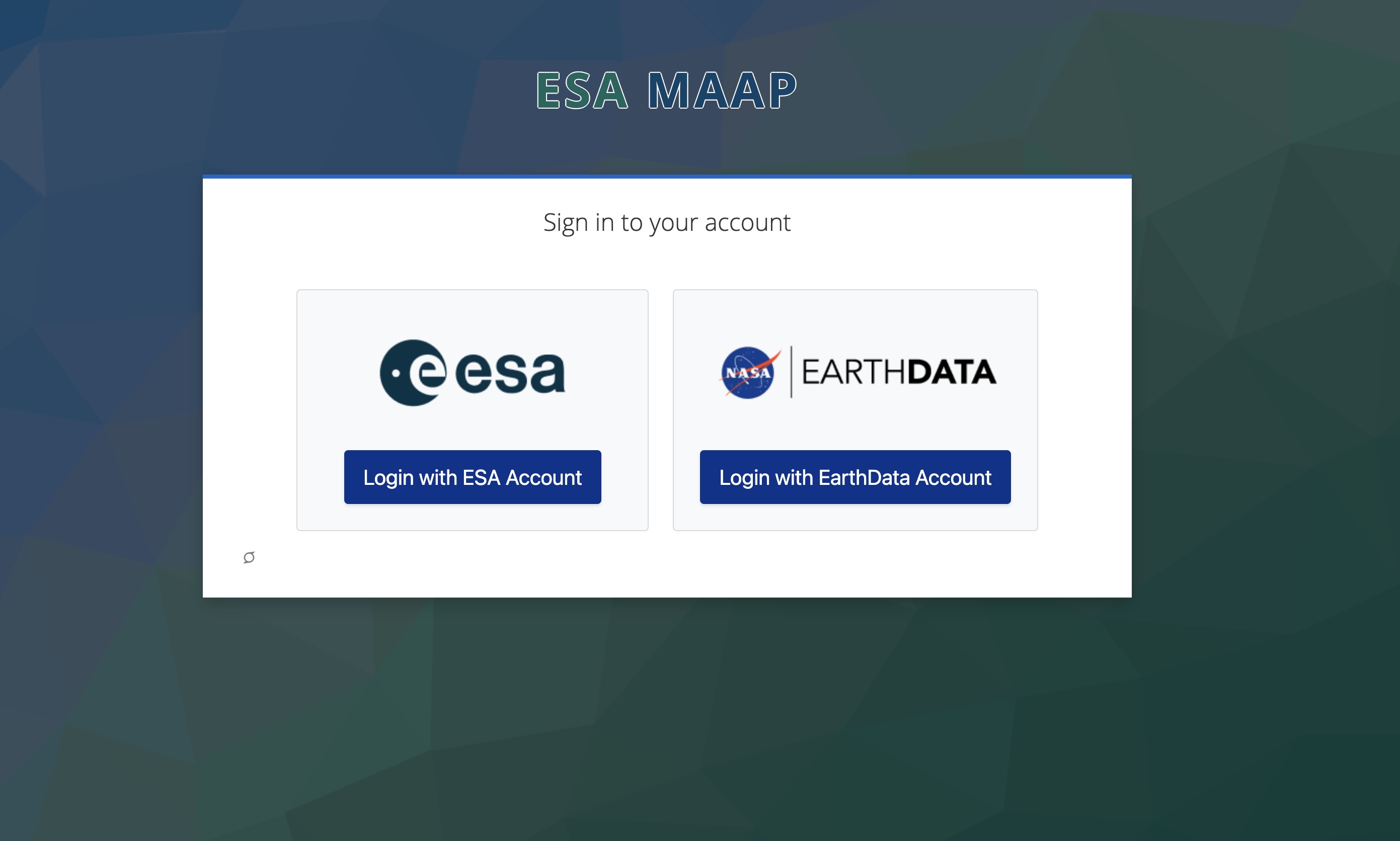
Open the token page in your browser: https://portal.maap.eo.esa.int/ini/services/auth/token/
Steps
Navigate to the URL above.
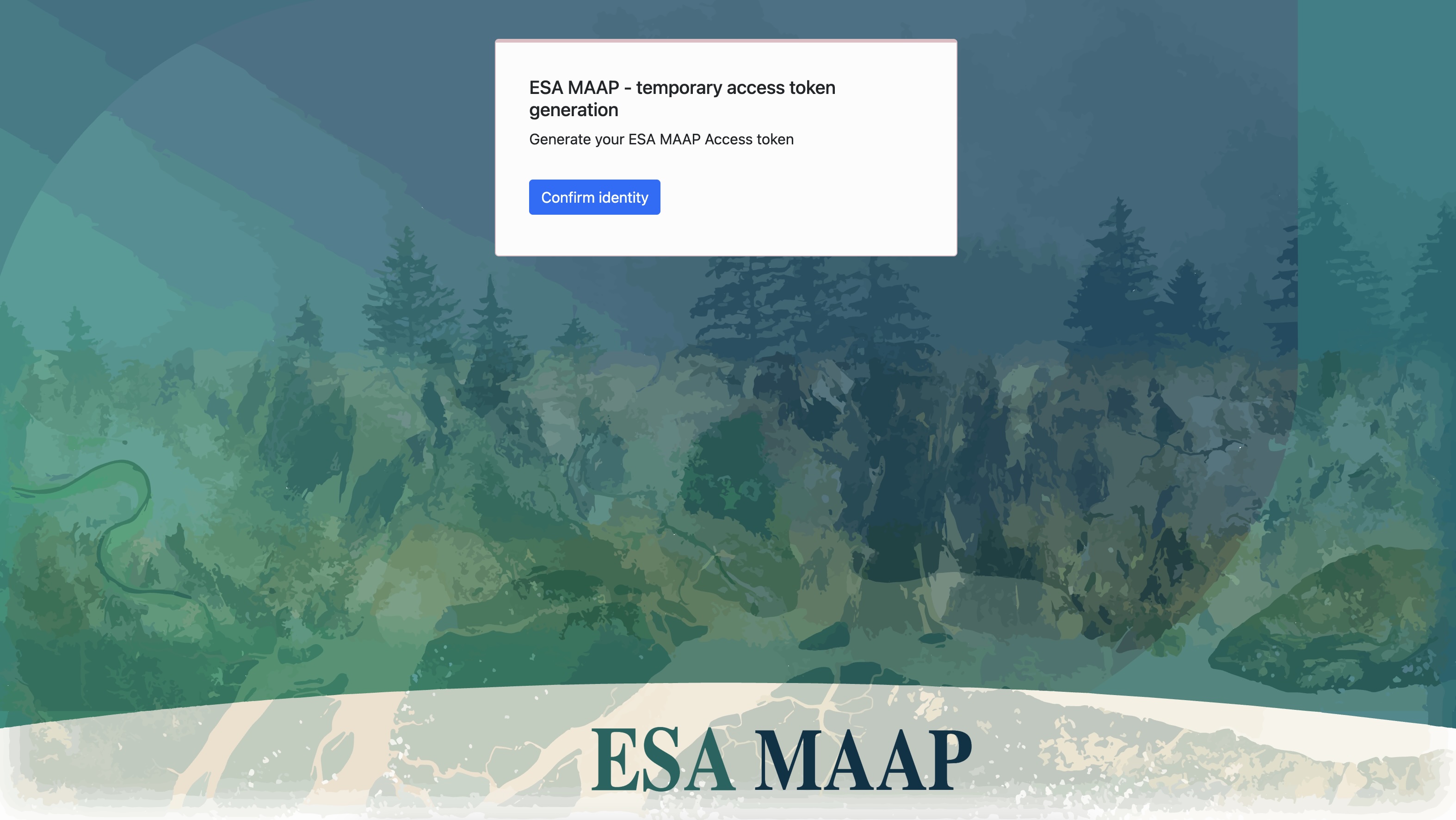
Choose NASA Earthdata Login (EDL) when prompted and authorize access.
After successful authorization you will see a token page showing your short‑lived access token string.
The below screenshots illustrate the process for each steps.
Portal entry page:
NASA EDL authorization screen:
Token page after authorization:
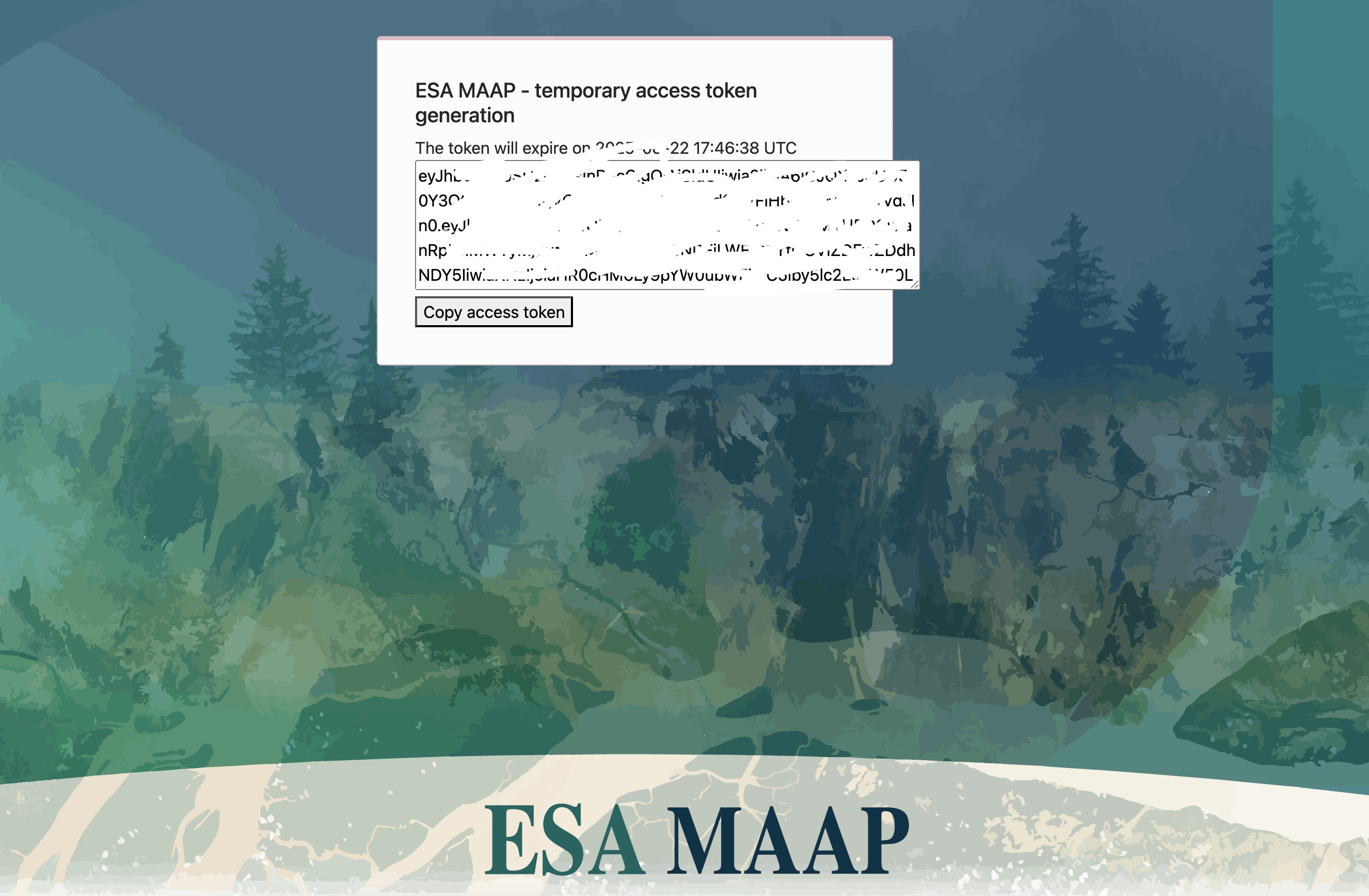
Copy the offline token value from the token page for use in the next cell.
Converting ESA MAAP Offline Token to get Short-lived Data Access Token
The steps to get short-lived data access token are described here, and also described below.
All API keys and tokens are stored in a credentials.txt file located in the home directory of user.
Steps
Navigate to the URL above.
Choose NASA Earthdata Login (EDL) when prompted and authorize access.
After successful authorization you will see a token page showing your long‑lived access token string. Copy this token.
Create a
credentials.txtfile in the user’s home directory. If the file already exists, do not create a new one and proceed directly to the next cell. Verify that the existing token is still valid, if it is not, replace it with a new token.Edit and copy the following snippet to the
credentials.txtfile.
CLIENT_ID=offline-token

CLIENT_SECRET=p1eL7uonXs6MDxtGbgKdPVRAmnGxHpVE

OFFLINE_TOKEN=your_esamaap_offline_token_here
Run the following cell to retrieve the short-term access token.
Notes
Treat tokens as secrets. Do not commit them to version control or share publicly.
[3]:
# --- Path to credentials.txt ---
CREDENTIALS_FILE = (Path.home() / "credentials.txt").resolve()   # Insert the .txt path

def load_credentials(file_path=CREDENTIALS_FILE):
    """Read key-value pairs from a credentials file into a dictionary."""
    creds = {}
    if not file_path.exists():
        raise FileNotFoundError(f"Credentials file not found: {file_path}")
    with open(file_path, "r") as f:
        for line in f:
            line = line.strip()
            if not line or line.startswith("#"):
                continue
            if "=" not in line:
                continue
            key, value = line.split("=", 1)
            creds[key.strip()] = value.strip()
    return creds


# --- ESA MAAP API ---

def get_token():
    """Use OFFLINE_TOKEN to fetch a short-lived access token."""
    creds = load_credentials()

    OFFLINE_TOKEN = creds.get("OFFLINE_TOKEN")
    CLIENT_ID = creds.get("CLIENT_ID")
    CLIENT_SECRET = creds.get("CLIENT_SECRET")

    if not all([OFFLINE_TOKEN, CLIENT_ID, CLIENT_SECRET]):
        raise ValueError("Missing OFFLINE_TOKEN, CLIENT_ID, or CLIENT_SECRET in credentials file")

    url = "https://iam.maap.eo.esa.int/realms/esa-maap/protocol/openid-connect/token"
    data = {
        "client_id": CLIENT_ID,
        "client_secret": CLIENT_SECRET,
        "grant_type": "refresh_token",
        "refresh_token": OFFLINE_TOKEN,
        "scope": "offline_access openid"
    }

    response = requests.post(url, data=data)
    response.raise_for_status()

    response_json = response.json()
    access_token = response_json.get('access_token')

    if not access_token:
        raise RuntimeError("Failed to retrieve access token from IAM response")

    return access_token

token = get_token()
Discover tiles via ESA STAC
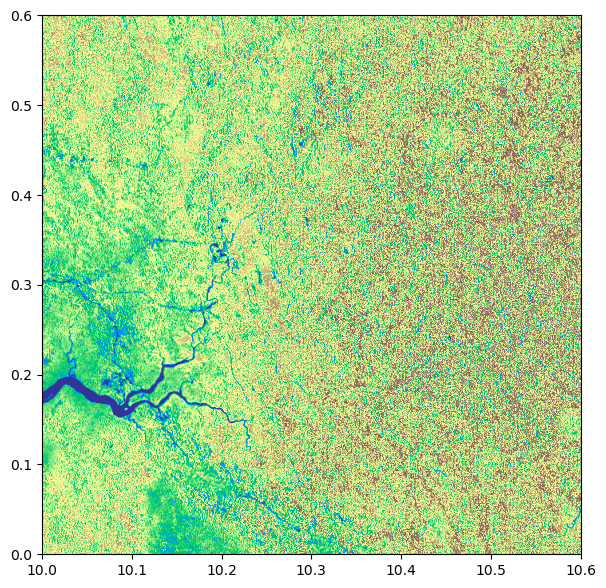
Now, we will query the ESA STAC API for CCIBiomassV5.01 over the given bounding box and time range, and then select the COG data assets URLs for this AOI and time range. We handle pagination, prefer assets labeled as COG data, and record the AOI window for efficient partial reads.
[4]:
STAC_URL = "https://catalog.maap.eo.esa.int/catalogue/"
COLLECTION = "CCIBiomassV5.01"
BBOX = [10.0, 0.0, 10.6, 0.6]
DT = "2010-01-01/2010-12-31"
[5]:
api   = Client.open(STAC_URL)
items = list(api.search(collections="CCIBiomassV5.01", bbox=BBOX, datetime=DT, limit=10).get_items())
hrefs = []
for it in items:
    for a in it.assets.values():
        if (a.media_type and "geotiff" in a.media_type.lower()) or a.href.lower().endswith(".tif"):
            hrefs.append(a.href)
assert hrefs, "No GeoTIFF assets found for AOI/year."
Creating a Mosaic
Open the selected COG tiles with token-auth, then merge them within the AOI (BBOX) to build a single mosaic. Record the nodata value from the first source and close all datasets to free handles.
[6]:
with rio.Env(GDAL_HTTP_HEADERS=f"Authorization: Bearer {token}",
             GDAL_DISABLE_READDIR_ON_OPEN="EMPTY_DIR", GDAL_NUM_THREADS="ALL_CPUS"):
    srcs = [rio.open(h) for h in hrefs]
    mosaic, out_transform = merge(srcs, bounds=BBOX)   # mosaic: (bands, y, x)
    nodata = srcs[0].nodatavals[0]
    for s in srcs: s.close()
[7]:
mosaic_band = mosaic[0]

if nodata is not None:
    masked = ma.masked_where(np.isclose(mosaic_band, nodata), mosaic_band)
else:
    masked = ma.masked_invalid(mosaic_band)

fig, ax = plt.subplots(figsize=(7, 7))
img = show(masked, transform=out_transform, cmap="terrain", ax=ax)
Saving Tile as COG
Finally, we can save the tile as COG locally. We validate tiling, block size, compression, and overview count here.
[8]:
assert 'mosaic' in globals() and 'out_transform' in globals(), "Run the mosaic cell first."

out_cog = "cci_biomass_v5_mosaic_cog.tif"

is_float = np.issubdtype(mosaic.dtype, np.floating)

def _is_number(x):
    try:
        return x is not None and not (isinstance(x, float) and np.isnan(x))
    except Exception:
        return False

if _is_number(nodata):
    fill_value = int(nodata) if not is_float else float(nodata)
    write_nodata = fill_value
else:
    fill_value = np.nan if is_float else -9999
    write_nodata = None if is_float else -9999

to_write = masked.filled(fill_value).astype(mosaic.dtype) if 'masked' in globals() else mosaic

# --- handle 2D vs 3D ---
if to_write.ndim == 2:
    count = 1
    height, width = to_write.shape
elif to_write.ndim == 3:
    count, height, width = to_write.shape
else:
    raise ValueError(f"Unexpected mosaic dims: {to_write.ndim}, shape={to_write.shape}")

profile = {
    "driver": "COG",
    "dtype": to_write.dtype.name,
    "count": count,
    "height": height,
    "width":  width,
    "crs": "EPSG:4326",
    "transform": out_transform,
    "nodata": write_nodata,
}

cog_opts = {
    "BLOCKSIZE": "512",
    "COMPRESS": "LZW",
    "OVERVIEWS": "AUTO",
    "NUM_THREADS": "ALL_CPUS",
    "RESAMPLING": "NEAREST",
}

with rio.open(out_cog, "w", **profile, **cog_opts) as dst:
    if to_write.ndim == 2:
        dst.write(to_write, 1)      # single band
    else:
        dst.write(to_write)         # multi-band

with rio.open(out_cog) as ds:
    print({
        "driver": ds.driver,
        "dtype": ds.dtypes[0],
        "count": ds.count,
        "tiled": ds.profile.get("tiled"),
        "block": (ds.profile.get("blockxsize"), ds.profile.get("blockysize")),
        "compress": ds.profile.get("compress"),
        "overviews": ds.overviews(1),
        "nodata": ds.nodata,
        "shape": (ds.height, ds.width),
    })
{'driver': 'GTiff', 'dtype': 'uint16', 'count': 1, 'tiled': True, 'block': (512, 512), 'compress': 'lzw', 'overviews': [2], 'nodata': None, 'shape': (675, 675)}
Here we make a request to the example tile using the token to check that authentication is working.
[9]:
# Use the first item from our STAC query as an example tile
assert hrefs, "No GeoTIFF assets found for AOI/year."
V5_EXAMPLE_URL = hrefs[1]

print("Using example tile from STAC query:", V5_EXAMPLE_URL)
Using example tile from STAC query: https://catalog.maap.eo.esa.int/data/biomass-maap-01/CCIBiomassV5.01/2010/01/01/N00E010_ESACCI-BIOMASS-L4-AGB_SD-MERGED-100m-2010-fv5.0/N00E010_ESACCI-BIOMASS-L4-AGB_SD-MERGED-100m-2010-fv5.0.tif
[10]:
headers = {"Authorization": f"Bearer {token}"}
r = requests.get(V5_EXAMPLE_URL, headers=headers, stream=True)

print("HTTP status:", r.status_code)
if r.status_code == 403:
    print(
        "403 Forbidden: Your account may need initialization for this collection.\n"
        "Follow any initialization link provided by the server, refresh the token, and retry."
    )
elif r.status_code == 401:
    print("401 Unauthorized: Token expired or invalid. Get a new token at the portal URL and update token.")
elif r.status_code != 200:
    print("Unexpected status. Check URL, permissions, or try another tile/year.")
else:
    print("Access OK.")
HTTP status: 200
Access OK.
[11]:
env = {"GDAL_HTTP_HEADERS": f"Authorization: Bearer {token}"}

with rio.Env(**env):
    with rio.open(V5_EXAMPLE_URL) as ds:
        arr = ds.read(1, masked=True)

        # Apply scale/offset if present
        scale  = (ds.scales  or [1.0])[0]
        offset = (ds.offsets or [0.0])[0]
        arr = arr * scale + offset

        # Full-range limits
        v = arr.compressed()
        vmin, vmax = (v.min(), v.max()) if v.size else (None, None)
        print("Value range:", vmin, vmax)

        # Plot like your first figure (rasterio.show, north-up, georeferenced)
        fig, ax = plt.subplots(figsize=(7, 7))
        ax = show(arr, transform=ds.transform, cmap="terrain", vmin=vmin, vmax=vmax, ax=ax)
        im = ax.images[0]  # image added by rasterio.show
        cbar = plt.colorbar(im, ax=ax, fraction=0.036, pad=0.02)
        cbar.set_label("AGB (Mg/ha)")
        ax.set_title("COG native resolution (AGB Mg/ha)")
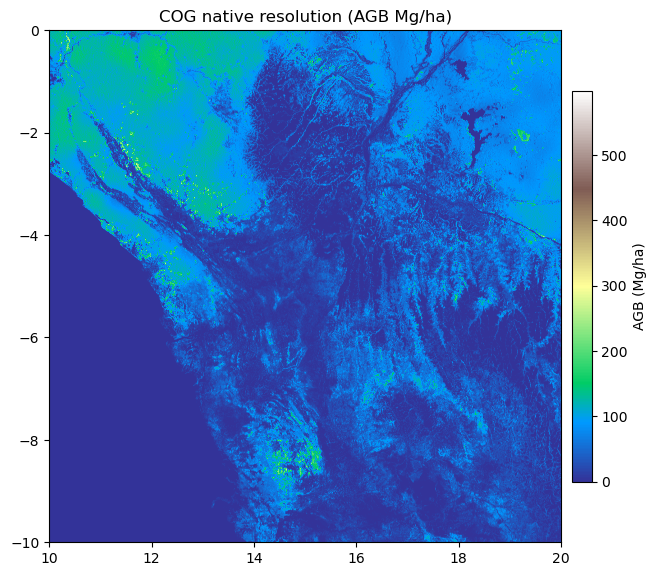
Value range: 0.0 598.0